About Us

Cameramazon is sharing the knowledge of photography for everyone !!!

author

Amcrest ProHD 1080p Wifi wireless review

Leave a Comment
Amcrest-proHD-1080p-wifi-wireless
Are you thinking about making your house a little more secure? Not feeling safe yet? After reading this article, you will surely find some alternative to your old security system and an upgradation for the same. This is one of the most popular security systems found these days and a huge number of people are recommending it to their close ones. Amcrest ProHD 1080p  is one of its kinds available to you along with a number of attractive features and specifications.
It comes with a full HD 1080p 30 fps video recorder and wireless Wi-Fi setup cameras to keep track of events around the cameras.

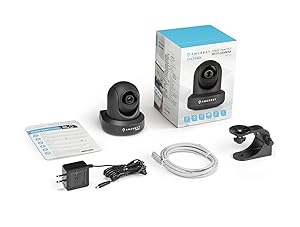
Shipment package is extremely small


You wouldn’t believe how powerful this security camera can be if you don’t use it in the first place. The package just consists of the small security camera. Now, some of you might be wondering that ‘how am I suppose to control it?’ most of us wonder the same at first. You can use your computers, laptops or for that matter even your mobile phones to control the device and make it work according to you. No wires or remotes come along with the product.

Saves you the cost of installation

As already mentioned earlier, the device is just a small one and no cable or wires come with it and neither the hassle of installation nor the charges associated with it. Setting it up is a cakewalk, set it at a convenient place wherever you want it and use the QR code provided at the bottom of the camera using your Amcrest View Lite smartphone app and you will be ready to go and get the video streaming. Isn’t that easy enough?

No external remote control system

Once your phone is compatible with the new Amcrest security camera you can control the camera and the video feeds that it has captured, just by a touch of your smartphone. Digital zooming and tilting facility is also available and all this you can control with your phone or laptop or computer, whichever you wish.

Clear images and Full HD videos

You have the assurance of clean and detailed images and videos when you use it. You will be amazed to see the accuracy of the images. The Amcrest 1080p Reviews will help you know the product better. It has a 1920 X 1080 resolution at 30 FPS. Clear and Crisp images are what it provides.

Stores extra data

Not just in Amcrest Cloud, this Amcrest security camera makes provisions for storage on a micro SD card, an NAS, FTP server or even your laptop, computer or smartphone for that matter. You can choose any one of these at any time and change it according to your convenience and requirement.

Advance pan tilt and digital zoom

The visual range of this Amcrest Security camera is 90 degrees, but it can be tilted 360 degrees to give a wide range of view. The tilt and pan can be controlled easily using any compatible device with the camera.

Some other special features of this product are:

  • This device has a brilliant night vision up to 32 feet. The 12 IR LEDs associated with this device provides this powerful feature of the camera making it an even more utilized and useful product.
  • You can talk and listen, both at the same time, as a result of its two-way audio system.
  • 4 hour free trial storage is provided on the Amcrest Cloud once you install and login, through your device to control the camera.
  • Technical support of a lifetime and a one year domestic warranty also comes in free with the product.
After reading the Amcrest 1080p reviews and taking a note of all its features, you must be rethinking of your existing security system and wishing to replace it with Amcrest security cameras. It is suggested that it would be a wise decision on your part. This camera is not just convenient and easy to install, it has a huge number of added benefits also. The device can be used at the darkest of dark nights to give you the clearest picture of what is going on around you. You can also get feeds from it on your smart phone or any other compatible device just with a swish of a finger. The motion alerts are also worth mentioning. You can also opt of email alerts or snapshots if you want to be double sure.
Zoom and tilt of this device are just fine. You would enjoy it. The price for this camera is also to look out for. Inexpensive and easily available, this device is even more attractive for the new buyers. So it does save a lot of money on your part as you are saving two ways- firstly by buying the product at an affordable price and secondly by saving the few bucks on installation and initial technical help. Huge amount for the pocket isn’t it?

Some Drawbacks:

  • The Wi-Fi connectivity is not as strong as mentioned and a number of problems related to internet access have been observed off late.
  • The app is a little outdated and needs to be taken care of for the best services.
  • The user manual that comes along with the security camera is somewhat ambiguous and not so useful for first timers.
In the Amcrest 1080p Reviews, you can see the specialty of the product, but it is suggested that you should not be satisfied just by this review but see it for yourself and satisfy your needs and demands of a good security camera. It won’t disappoint you. Not without reason has it become the leading product today. Invest the few bucks and experience safety more than ever. Choose your monitoring system and have a happy stay!
Read More

Canon EF 50mm f/1.8 STM Lens compatibility and reviews

Leave a Comment
Canon-EF-50mm-f/1.8-STM-Lens-compatibility-and-reviews
Introduction

Canon EF 50mm f/1.8 STM  prime lens enables you to capture images with subjects that pop from the scene, or create impact with beautiful background blur. The successor to the incredibly popular EF 50mm f/1.8 II, and an ideal second lens for anyone looking to take their photography to the next level, the EF 50mm F/1.8 STM excels at portraiture, low-light photography, and adding an artistic edge to everyday objects and settings, thanks to its wide f/1.8 maximum aperture and 50mm focal length.

The EF 50mm f/1.8 STM now features an improved design, Canon’s super spectra lens coating, a 7-blade aperture and STM technology for smooth, near silent focusing. Compact, lightweight and affordable, the EF 50mm f/1.8 STM is a welcome addition to any kit bag for people who want to create more impactful imagery.


Pros of Canon EF 50mm f/1.8 STM Lens 


  • Quirky STM motor that’s definitely more quiet than its predecessor (see Cons for quirkeiness). Performed well for movie recording, focused pretty fast too.
  • Updated design looks good on current Canon DSLRs.
  • Metal lens mount nice update from previous plastic mount.
  • Improved manual focusing ring, although manual focusing itself has a few oddities.
  • Manual focus override when half-pressing the shutter. A cool feature for a $125 lens. In other words, you can stay in AF mode, but tweak the focus manually by half-pressing the shutter button and turning the focusing ring.
  • Seven aperture blades for smoother bokeh (compared to 5 blades before).
  • Reasonable minimal focusing for close up photography.
  • Optional bayonet mount lens hood available (and yes, it does reverse.)
Features and specifications


Aperture
Aperture Range - Wide / Longf/1.8-22
Number of Aperture Blades7
Rounded Aperture?Y

Weight
Manufacturer Specification Weight5.6 oz
Actual Weight5.6 oz
Lens Hood Weight0.7 oz
In-Use Weight6.3 oz
Size
Manufacturer Spec Size (DxL)2.72 x 1.55”
Measured Size (DxL)2.77 x 1.83”
Max Length at Full Extension2.28”
Internal Zoom? / Extends with Zoom?
Internal Focusing? / Extends with Focusing?N / Y
Focus Extension Length0.48”
Lens Hood Size (DxL)3.3 x 1.43”
Lens Length with Hood (Min / Max)3.03 / 3.03”
Size of Rings - Zoom / Focus/ 0.28”
Filter Size49mm  
Front Element (Filter Mount) RotatesN
Focus
AF Motor TypeSTM
Full Time Manual Focus
Focus Ring Rotation156°
Focus Limiter? / Focus Limiter RangesN
Distance Scale? / TypeN
Close Focus
Specified Min Focus Distance13.8” / 13.1”
Tested Min Focus Distance (Wide / Long)
Maximum Magnification (MM)0.21x
Magnification Range with 12mm Ext Tube0.45-0.24x
Magnification Range with 25mm Ext Tube0.74-0.53x
Features
Tripod Ring Included? / Removable?N
Zoom Ring Lock Switch?
Lens Hood Included / Model?N / ES-68 
Weather Sealed? / Filter Required?N
Image Stabilization? / Stops? / Tripod Sensing?N
Extender Compatible?N
Case Included? / Type?N / LP1014 
47.25" x 31.5" Subject Framing Distance50mm = 5.87'

  Cons


  • Manual focusing only works when camera is on, thanks to the STM system. In fact, if you want to retract the lens barrel all the way in, you need to turn on the camera to do so.
  • Lens not super sharp, but sharp enough. It does capture a pleasing rendering of scenes.
  • Along those lines, it tends to underexpose a tad at f/1.8.
Conclude


It is easy to love a lens with perfect optical quality, best-available AF and first-class build quality. Start dropping any of those attributes and size, weight and price concessions are expected with the amount of the price concession being the all-important factor for many. In this case, the price concession is very substantial, easily making the 50 STM Canon's lowest priced lens. This ultra-low price, combined with an extremely light weight (only Canon's pancake lenses and the 50mm f/1.8 II are lighter), very small size (only Canon's pancake lenses are shorter) and impressive stopped down image sharpness, immediately (and unsurprisingly) launched the Canon EF 50mm f/1.8 STM Lens to the pinnacle of Canon's best seller list.


Read More

Good genes: Samsung NX500 review posted

Leave a Comment

Good-genes-Samsung-NX500-review-posted

With the release of its NX1, Samsung showed that they can play with the 'big boys' in the enthusiast ILC arena. The company's NX500 brings the majority of the features from the NX1 and put them into a compact body with a more consumer-friendly price point. The most significant features inherited by the NX500 are the NX1's excellent 28MP BSI CMOS sensor and hybrid autofocus system.
Key Features
  • 28MP BSI CMOS sensor (APS-C)
  •  DRIMe Vs processor
  • Samsung NX lens mount
  • Samsung NX lens mount
  • Hybrid autofocus system
  • 3" flip-up touch Super AMOLED display
  • 9 fps continuous shooting
  • 4K/UHD video recording
  • Wi-Fi with NFC and Bluetooth

Some of the other features on the NX500 are very similar to those of its big brother, just scaled back. The image processor is not as powerful, video recording not as elaborate (no full-sensor readout), burst speed slower and the body not weather-sealed. The NX500 also lacks an electronic viewfinder, built-in flash and and top-mounted LCD info display.

So what does the NX500 have, aside from the aforementioned sensor and autofocus system? It has a compact, lightweight body with a 180 degree tilting touchscreen LCD. Unlike a lot of mass market ILCs, the NX500 has twin dial operation, making shutter speed and aperture adjustments a snap. It doesn't have a built-in flash, though it does have a hot shoe and a small external flash comes in the box. The NX500 also has an advanced Wi-Fi system that uses Bluetooth to maintain connections, so there's no need to re-pair every time you want to transfer a photo (with compatible devices). The one feature that really separates it from other cameras in its price range is its 4K video capability, which will be covered in more detail later in the review.

To say that the NX500 is in a crowded market is an understatement. Every major player has a camera that matches up against it, including the Canon EOS M3, Fujifilm X-A2, Nikon 1 J5, Panasonic Lumix DMC-GF7, Olympus PEN E-PL7 and the Sony Alpha a5100. By the end of this review you should have a pretty good idea as to how the NX500 stacks up.

System
Samsung has quietly built up a good-sized collection of NX-mount lenses. In addition to standard kit lenses (18-55mm, 20-50mm) and inexpensive zooms (50-200mm, 18-200mm) there are also a decent selection of primes, ranging from 16mm to 85mm (plus a 10mm fisheye).              
This is the 16-50mm F3.5-5.6 OIS kit lens. It's a power zoom, which keeps it compact when shut off and zooms when you rotate the ring on the front of the lens or the + and - button on the barrel.Above is Samsung's premium S-series 16-50mm F2-2.8 OIS lens, which we've been very impressed with.                                                                                                              

              The two most impressive lenses are in Samsung's S-series, which include a 16-50mm F2-2.8 and 50-150mm F2.8 OIS. They look kind of silly when mounted on the petite NX500, but they're fantastic lenses.
Colors and Pricing
Good-genes-Samsung-NX500-review-posted
The NX500 comes in three colors - brown, black and white - and includes a 16-50mm F3.5-5.6 power zoom lens with optical image stabilization at a suggested retail price of $799.


Read More

Nikon 1 J5 review: is this Nikon’s best CSC?

Leave a Comment
With its new 20.8 million pixel CX-format (one-inch) sensor, the Nikon 1 J5 has the highest resolution of any Nikon 1 camera yet, and it’s stylish, practical, and small enough to compete with regular compact cameras, not just other CSCs.

In her Nikon 1 J5 review video, Amy Davies highlights some of the key specs and features and takes a look at the camera’s performance.


SEE MORE: Best budget camera – 6 top options under £350 / $450 tested and rated

Nikon 1 J5 Review Video Transcript

Hi, I’m Amy Davies, and today I’m here to look at the Nikon J5.

The J5 features a new 20.8 million pixel CX-format, otherwise known as one-inch, sensor, making it the highest resolution of any Nikon 1 camera to date.

There are a number of other interesting new features including a new fast processing engine, the Expeed 5A, and a top sensitivity speed of ISO 12,800.

As we’ve seen with other Nikon 1 cameras, it’s capable of very fast shooting, with an incredibly high 60fps available with focus is fixed at the start of the sequence. As the camera’s shutter is electronic, it’s also capable of very fast shutter speeds – the quickest available being 1/16000th of a second.

As you can see, Nikon has opted for an attractive two-tone design for the J5, giving it a bit of a slicker and more retro appearance than the J4 it replaces. Although this body is plastic, it looks like metal and feels nicely put together. This faux leather covering is quite stylish and gives the grips a little extra purchase.
Nikon 1 J5 review: is this Nikon’s best CSC


SEE MORE: Canon vs Nikon: the DSLR comparison you’ve been waiting for!

Let’s have a look at how to use some of the J5’s dials and buttons

Here you’ll see there’s a mode dial on the top plate, just like on the J4 or the V3. However, this has been improved to now include a direct route to classic exposure modes such as aperture priority and shutter priority. There’s also a collection of scene and fully automatic options.

There’s quite a few direct control buttons, but there’s also a couple of dials – here and here – which make adjusting key settings easy. This first dial here, is used for altering shutter speed when you’re in shutter priority or manual mode, as well as having some functionality when in playback.

This second dial here, is used for altering aperture – when you’re shooting in aperture priority and manual mode.

You’ll find a customisable function button here on the front of the camera, which can be assigned to one of seven different settings. One of those options is sensitivity, which is a good choice for those who would need to change sensitivity frequently.

Pressing this button here labelled with an F, brings up a number of key settings for quick access. This saves you from having to delve into the main menu, and although this menu is not customisable, there are only a few options within it, so there shouldn’t be lots of unnecessary scrolling.

SEE MORE: Digital SLR cameras explained – 10 things every new photographer should know

Now let’s see what the screen has to offer

This screen here is on a hinge so you can move it to face all the way forwards to shoot selfies. You can also pull it out to face upwards when you’re shooting from low down, and you can also point it downwards for when you’re shooting over your head. It’s also touch sensitive and is nicely responsive.

You can choose to set the autofocus point with the screen, simply by tapping the area you need, or if you prefer, you can have the camera focus and fire off the shutter release when you touch the screen. This can be especially useful if you’re using a tripod or shooting from an awkward angle and don’t want to have to use the actual shutter release button.

The touchscreen can also be used to make settings changes when using the function menu and to scroll through pictures. The good thing here is that you don’t have to use the screen – pretty much everything it can do can also be achieved using one of these buttons here, if you prefer the feel of tactile buttons. I’ve found that my preferred way of working is to use a combination of the buttons and the touchscreen.

Using manual focus with the J5 is not quite as nice an experience as with some other cameras currently on the market. Once you’ve selected Manual Focus from the function menu, you press the OK button to see a magnified view of the scene. You then use the scrolling dial on the back of the camera to adjust focus. If you’re using this kit lens, you’ll see there’s no focusing ring on the lens itself, so using the buttons is the only way to set focus. It’s also worth noting that the J5 doesn’t offer focus peaking.
DON’T MISS
Canon cameras – the full and complete range explained from IXUS to EOS
Nikon cameras – the full and complete range explained
Sony cameras – the full and complete range explained
Olympus cameras – the full and complete range explained
Panasonic cameras – the full and complete range explained

Moving on to the camera’s performance

It’s clear that the improvements Nikon has made to the J5’s sensor has had a significant impact on image quality. There’s no anti-aliasing filter, so the amount of detail resolved is very good – especially when you’re viewing an image at normal printing and web sizes.

Overall, the camera’s general-purpose or matrix metering system does a good job to and produces accurate exposures, while automatic white balance copes well with a variety of different lighting conditions.

Autofocusing speeds are one of the J5’s key selling points. In good light, the lens is able to snap to focus incredibly quickly, and while the lens will usually hunt around a little in lower light, it’s still pretty good in all but the very darkest of conditions.

Switching to tracking focus allows you to keep focus on a moving subject. In practice this works quite well, but it can be distracted if another similar looking subject enters the frame – so it’s less useful for photographing subjects like team sports.

Another headline specification of this camera is its 60fps shooting capability – that’s way above and beyond the realms that DSLRs can achieve. However, this is limited by the camera’s buffer capacity – it can only hold around 20 shots before it will stop shooting, so your timing needs to be pretty accurate as you can only shoot for a fraction of a second at a time.

The J5 is the first Nikon camera that’s capable of shooting 4K video, but at that resolution it’s limited to 15 frames per second – so it’s not likely to be a hugely popular option. Full HD video recording is also available at variety of frame rates up to 60fps.

There’s also a 120fps option for 4x slow motion playback. Plus it’s possible to create time lapse movies. Serious videographers should note that there’s no microphone or headphone socket, though.


Read More

Best DSLRs under £500

Leave a Comment
DSLRs may appear somewhat boxy and dated next to the more stylish offerings from mirrorless sector, but there’s such a vast selection of highly capable models under £500 that it would be foolish to ignore them.

Best-DSLRs-under-£500-1

With more substantial grips, many also offer far better handling than the average mirrorless camera, and balance better when using longer or heavier lenses.

Being less reliant on their LCD screen than their viewfinder also places less strain on their batteries (which tend to offer higher capacities than those inside mirrorless models anyway), while their compatibility with a much broader selection of lenses means you’re more likely to find what you need at a more attractive price point than the equivalent lens for a mirrorless camera – particularly when you factor in third-party lenses from the likes of Sigma and Tamron.

So, if you have a small budget to play with and you want take your photography more seriously with such a camera, exactly what are your choices?

We’ve rounded up ten of the best DSLRs under £500 and sifted through their specs to find out where they impress and where they fall short next to their rivals.

Prices stated are body-only, followed by ‘with kit lens’ in brackets

BEST DSLRS UNDER £500

Canon EOS 100D
Canon EOS 700D
Canon EOS 750D
Nikon D3300
Nikon D5200
Nikon D5300
Nikon D5500
Pentax K-50
Pentax K-S2
Sony A58
SEE MORE: Best camera money can buy? 6 bodies go head to head

Best DSLRs under £500: Canon EOS 100D / Rebel SL1
Best-DSLRs-under-£500-2

Sensor: APS-C, 18Mp | Lenses: Canon EF, EF-S | Monitor: 3-inch, 1,040K dots | Viewfinder: Optical | Continuous shooting: 4fps | Movies: 1080p | User level: Beginner

Price on Amazon US $399.00 ($499.00 with 18-55mm kit lens) / Price on Amazon UK £279.00 (£315.00 with 18-55mm kit lens)

Canon’s intentions with the EOS 100D were for it to be as small as possible whilst still offering everything you could reasonably expect from an entry-level DSLR.

It features, for example, the same 18MP APS-C sensor and DICIG 5 processor as the pricier EOS 700D, while the touchscreen on the rear also bears the same 3in dimensions as most other DSLRs on the market.

You also get Full HD video with a Hybrid CMOS AF II system to allow autofocus when recording, as well as compatibility with decades worth of EF and EF-S lenses, flashguns and other accessories.

True, there’s no Wi-Fi or NFC, and the camera’s continuous shooting rate of 4fps is somewhat unremarkable, but if you’re a first-time DSLR user not wanting to spend too much you’d be wise to add it to your shortlist.

Pros
– Compact and lightweight body
– Great value
Cons
– No Wi-Fi
– LCD screen fixed in position

SEE MORE: Best budget camera: 6 top options under £350 / $450


Best DSLRs under £500: Canon EOS 700D / Rebel T5i


Sensor: APS-C, 18Mp | Lenses: Canon EF, EF-S | Monitor: 3-inch articulating, 1,040K dots | Viewfinder: Optical | Continuous shooting: 5fps | Movies: 1080p | User level: Beginner

Price on Amazon US $649.00 ($649.00 with 18-55mm kit lens) / Price on Amazon UK £364.00 (£369.55 with 18-55mm kit lens)

Now over two-and-a-half years old, many will naturally overlook the EOS 700D for the glitzier EOS 750D and 760D replacements, but those that don’t should find plenty to keep them happy – at a knockdown price.

You get, for example, Full HD video recording in a choice of frame rates, with servo autofocus and a microphone port to take sound to the next level, as well as a high-resolution, fully articulating LCD screen that offers touchscreen control for a variety of the camera’s functions.

Canon has also equipped the model with a 5fps burst shooting mode and an all-cross-type 9-point AF system, together with a handful of Creative Filters to instantly process your images into a range of different styles such as Toy Camera and Miniature.

Right now the camera is also well over £100 cheaper than the EOS 750D that replaced it, so if you’re also looking to invest in some glass it’s worth considering. You may, however, want to compare it to the very similar (but cheaper) EOS 100D above.

Pros
– Significantly cheaper than the EOS 750D/760D replacements
– Inclusion of a mic port is nice touch for videographers
Cons
– 18MP sensor starting to look a little old
– 9-point AF system bettered by other models here

SEE MORE: Canon 760D vs 750D vs 700D – 9 things you need to know

Best DSLRs under £500: Canon EOS 750D / Rebel T6i
Best-DSLRs-under-£500
Sensor: APS-C, 24.2Mp | Lenses: Canon EF, EF-S | Monitor: 3-inch articulating, 1,040K dots | Viewfinder: Optical | Continuous shooting: 5fps | Movies: 1080p | User level: Beginner

Price on Amazon US $749.00 ($749.00 with 18-55mm kit lens) / Prize on Amazon UK £494.00 (£509.00 with 18-55mm kit lens)

Launched alongside the EOS 760D (below), this alternative manages to deliver much of that model’s functionality at a much more appealing price point.

Key technologies shared by both models include a 24.2MP APS-C sensor, a 5fps burst option and both W-Fi and NFC, together with a 19-point AF system that features cross-type points at every location – incidentally, the same AF system in the much dearer EOS 70D.

There’s also a 3in display that can not only be controlled by touch but also articulated around a joint at its side, and you can also take manual control over exposure while recording Full HD video.

You can even improve on the audio quality of the camera’s stereo microphones with an external unit, if you wish.

Overall, the EOS 750D represents an affordable way to enter Canon’s every-growing EOS system, with the further benefit of decades worth of optics to choose from.

Pros
– Great video specs
– Articulating touchscreen makes shooting from awkward angles easy
Cons
– Only one command dial
– 95% viewfinder coverage bettered by Pentax models

SEE MORE: Canon 750D / 760D review – which is the better buy?

Best DSLRs under £500: Nikon D3300

Best-DSLRs-under-£500
Sensor: APS-C, 24.2Mp | Lenses: Nikon DX, FX | Monitor: 3-inch, 921K dots | Viewfinder: Optical | Continuous shooting: 5fps | Movies: 1080p | User level: Beginner

Price on Amazon US $na ($446.95 with 18-55mm kit lens) / Price on Amazon UK £287.30 (£331.98 with 18-55mm kit lens)

Nikon’s most junior DSLR may lack some of the fancy trappings of the other models here, but if you want a solid set of specs for less than £300 it’s a fine choice nonetheless.

The 24.2MP sensor places it on a par with those of many rival models, and the ISO range’s expansion up to 25,600 (equivalent) settings is perfectly respectable for a model of the D3300’s billing.

It also delivers 5fps burst shooting, an 11-point AF system and full HD video recording up to 50/60p, while its quoted battery life of around 700 images far exceeds those of its rivals, who hover around the 450-shot mark.

Furthermore, the body-only weight of 410g makes it more portable than some of its rivals while the retractable kit lens with which it ships helps it to remain compact.

Sadly, Wi-Fi and GPS are nowhere to be found (although the camera does accept external units for both) but for those on a budget wanting a no-nonsense option it’s a smasher.

Pros
– Great value
– Excellent battery life
Cons?
– No Wi-Fi or GPS
– LCD fixed in position
SEE MORE:
Canon 1200D vs Nikon D3300 vs Pentax K-500 – which is the best entry-level DSLR?
Nikon D3300 vs D3200 vs D3100: which camera should you buy

Best DSLRs under £500: Nikon D5200
Best-DSLRs-under-£500
Sensor: APS-C, 24.1Mp | Lenses: Nikon DX, FX | Monitor: 3-inch, 921K dots | Viewfinder: Optical | Continuous shooting: 5fps | Movies: 1080p | User level: Beginner

Price on Amazon US $555.33 ($619.19 with 18-55mm kit lens) / Price on Amazon UK £299.99 (£389.99 with 18-55mm kit lens)

It may not be the newest model in this collection – indeed, it’s been twice replaced – but the D5200 equals much of the functionality of the other models here, so it might just fit the bill.

It matches, for example, the 24MP sensor resolution of many of its more recent competitors, while 5fps burst shooting and a fully articulating LCD screen show it to compete well elsewhere too. You even get a 39-point AF system with 9 cross-type points, which manages to cover a good proportion of the frame.

It also provides a port for external microphones should you want to take a little extra care over your full HD video recording, although Wi-Fi, NFC and GPS systems are al absent, and it’s a shame the screen can’t be controlled by touch. Still, the inclusion of these would no doubt make it more pricey.

SEE MORE:
Nikon D5200 vs D7100 – 14 differences you need to know
Nikon D5200 vs D3200 – which camera should you buy?
Pros
     – 39-point AF system covers a significant proportion of the frame
     – High-resolution sensor, despite the camera’s age
Cons
     –    No Wi-Fi or NFC
     –    No touchscreen

READ MORE
Best bridge cameras: 6 top options tested and rated
Sony A7S II vs A7R II vs A7 II: which should you buy?
8 camera features they make you think you need, but you really don’t
77 photography techniques. tips and tricks for taking pictures of anything
Canon vs Nikon: the DSLR comparison you’ve been waiting for!


Read More

Photo Recipes: Scott Kelby on how to balance camera settings and flash

Leave a Comment
In his new series in Digital Camera magazine and Digital Camera World, the legendary Scott Kelby reveals some of the behind-the-scenes secrets of some of his favourite images.
This month Scott explains how to find the perfect marriage between camera settings and flash to create a vision of beauty.
Words and images by Scott Kelby. You can follow Scott and his work on his blog or on his live photography talk show The Grid. You can also find Scott and his KelbyOne team on their Facebook page and on Twitter as @KelbyOne.
Scott-Kelby-remote-camera-tips-portrait-0The key to this photo is mixing the existing light in our location with  the light from our flash so the image doesn’t look like it’s lit with a flash (even though, of course, we know that it is). I did this by adjusting our shutter speed to control the existing room light (the ambient light) behind our bride.
Scott-Kelby-remote-camera-tips-portraitWe’re not breaking any new ground here positioning-wise — it’s a classic ‘bride standing in the aisle’ shot. The area behind her is dimly lit, but we want to see it in our image as the church she was married in is very important to the bride.
So we’re going to work to control the lighting in the background and get a nice blend.
I hope to help you see the light (pun totally intended) on two points. First, you can use the shutter speed to control the amount of light in the room.
Second, your job is to keep the lighting looking soft and subtle. Do test shots and check they’re not too ‘flashy’. Less is more in situations like this.
SEE MORE: Photo Recipes – Scott Kelby’s killer one-light portrait set-up

How to find the optimum exposure when using flash

How-to-find-the-optimum-exposure-when-using-flash-step-1
1 Get the flash in position
This behind-the-scenes shot shows the simple, one-light set-up I used for this shoot. I had an Elinchrom Ranger Quadra, with one flash head running off a small portable battery pack and a small square 27-inch softbox. Of course, you can do this exact same thing 
with a hotshoe flash and a 24-inch Lastolite pop-up EZ-Box softbox.
It was mounted on a lightweight, regular light stand. Why not a monopod mount, like I often use? Because when you want a break between shoots, you don’t have go looking for a place to lean it against or a table to sit it on — you just put it down on the floor. It’s just a convenience thing.
When I’m shooting with on-location flash, I have a formula for getting the look I’m after. First I turn off the flash, switch to Manual mode and set the shutter speed to 1/125 sec. It’s a nice, safe starting point that just works.
Next, I move the f/stop until the meter inside the viewfinder shows the exposure is correct – not under or over-exposed, the proper exposure. On Nikons, this meter appears on the right inside your viewfinder; for Canons, it’s along the bottom.
If you find that you can’t get to an f/stop that makes a proper exposure (it can get pretty dark in a church), you may have to raise your ISO a bit.
  SEE MORE: The best studio lighting for photography – 8 top options tested and rated
How-to-find-the-optimum-exposure-when-using-flash-step-2
2 Take an under-exposed shot
Next, I darken the exposure by around two stops. If my camera said that my exposure was correct at f/2.8, I’d raise it to at least f/5.6 to darken it by a full stop.
I took a test shot. I was trying to make the bride so dark that she was nearly a silhouette. I wanted her lit with only the light from my flash, not the ambient light in the church. The ambient light needed to light only the area behind her.
I saw one problem with the shot to the right:  the background (the church) was a little too dark. This is where the shutter speed control comes in because it controls the room lights.
Think of it as a dimmer switch for the church lights. If you need to turn up the lights a bit, all you have to do is lower the shutter speed a bit. I moved from my regular starting place of 1/125 sec down to 1/60 sec to see how that looked.
SEE MORE: Photo Recipes – Scott Kelby explains how to shoot on location with two lights
How-to-find-the-optimum-exposure-when-using-flash-step-3
3 Turn on the flash
Once the subject looks like a silhouette, I turn on the flash with a very low power setting (like 1/4 power) and take a test shot. The light here looked OK – but the whole scene looked a bit too bright. That kept the light from mixing well, so it didn’t look really beautiful quite yet.
However, you can really see the difference lowering the shutter speed from 1/125 down to 1/60 made — the church behind the bride is much brighter. In fact, I decided it was now too bright: it was too big a drop in shutter speed, so I was going to have to split the difference.
SEE MORE: Off-camera flash – how to stop fearing your flashgun and take control of lighting
How-to-find-the-optimum-exposure-when-using-flash-step-4
4 Take another test shot
Here I turned the camera to get a vertical shot and tried a slightly higher shutter speed of 1/80 sec. I hadn’t changed the power of the light yet — it’s around 1/4 power.
In this test shot, you can see we’re starting to get there. 1/80 sec seemed like the sweet spot, so now if I made any changes, I slightly raised or lowered the power of the strobe itself to make sure the light wasn’t too bright — a common mistake.
How-to-find-the-optimum-exposure-when-using-flash-step-5
If we want it to blend and look natural, it can’t look ‘flashy’. It has to make you wonder, “Is that lit with a flash?”
 SEE MORE: Flash portraits: creative off-camera lighting techniques you have to try
How-to-find-the-optimum-exposure-when-using-flash-step-5-1
5 Add a reflector
After looking closely at the previous image, I felt the area around her eyes looked a little dark, so I had my first assistant Brad Moore bring in a reflector, to bounce some of the light from the flash back into her eyes.
We took a test shot using the silver side of the reflector and it was just too bright and too harsh, so we filled over the reflector to the white side, and that did the trick.
SEE MORE: In-camera flash settings: exploring your built-in flash options

Photoshop tips for enhancing your lighting

Photoshop-tips-for-enhancing-your-lighting
1 Darken the edges
There’s a technique I use to make the lighting look even better and more dramatic. Once I have a shot where the balance looks pretty good, I take it into Photoshop’s Camera Raw plug-in (or Lightroom’s Develop Module — they are the same thing).
Next I go to the FX panel. Under Post Crop Vignetting, I drag the Amount slider to the left a little bit, which darkens the edges all the way around your image. This helps to create a more directional look to your lighting — it looks like the light is centred on your subject, and it falls off to darkness. It’s a simple thing to achieve, but it has a big impact.
darken-the-edges
2 Remove distractions
When I posted this image on Twitter, someone pointed out the bright area of light in the stained glass window to the left of the bride and noted that if this was someone else’s image, I would say that it was distracting.
He was right — so I used Photoshop’s Patch tool. You draw a loose selection around what you want to remove, click inside the selection and then drag to an area with similar tones. In this particular case, I dragged straight downward to another area of stained glass, and it worked perfectly first time.
READ MORE
6 simple lighting setups for shooting portraits at home
Read More
Previous PostOlder Posts Home
Powered by Blogger.